
E-Way Bill Login OTP and Two-Factor Authentication
Every E-Way Bill login needs an OTP after your password. This has applied to all users since 1 April 2025. You can get the OTP by SMS, in the Sandes app, or from the NIC-GST-Shield app. There is no legitimate way to log in without it. If SMS fails, switch to one of the apps.
On this page
Is OTP mandatory for E-Way Bill login?
Yes. The E-Way Bill and e-invoice systems introduced two-factor authentication (2FA) in phases, starting with larger taxpayers. From 1 April 2025 it became mandatory for all users of the E-Way Bill and e-invoice portals. This includes taxpayers, transporters and sub-users.
2FA means the portal checks two things: something you know (your password) and something you have (your phone or OTP app). Even if someone learns your password, they can't log in without the second factor. That protects your GSTIN from fake e-way bills generated in your name.
Can you log in without an OTP?
No. Search results and videos that promise a way to log in “without OTP” are either out of date (from before 2FA became mandatory) or are asking you to use unofficial tools. Never give your password to an app or website that claims to bypass the OTP, because it could misuse your account.
What you can do is choose an OTP method that suits you. For example, the NIC-GST-Shield app generates codes even without mobile signal.
The three official ways to receive your OTP
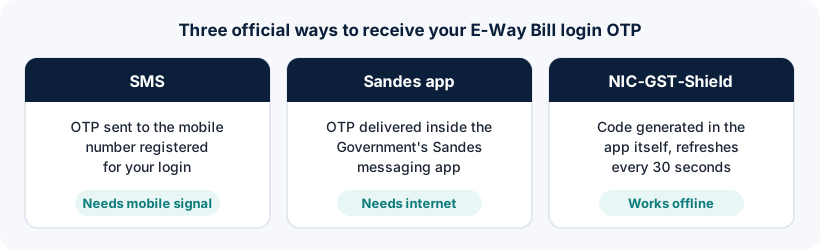
1. SMS to your registered mobile number
The OTP is sent by text message to the mobile number registered for your login. It's the simplest option but depends on network coverage and can be delayed when networks are busy.
2. Sandes app
Sandes is the Government of India's instant messaging app. The portal can deliver your OTP as a Sandes message. You need the app installed and registered with the same mobile number, and an internet connection.
3. NIC-GST-Shield app
NIC-GST-Shield generates the OTP inside the app itself. The code refreshes every 30 seconds and works without an internet connection once the app is set up and linked to your account. This makes it the most reliable option if SMS often fails where you work.
| SMS | Sandes | NIC-GST-Shield | |
|---|---|---|---|
| Needs a smartphone | No | Yes | Yes |
| Needs internet | No (needs mobile signal) | Yes | Not after set-up |
| One-time set-up | No | Install and register app | Install and link to your account |
| Best for | Occasional users | Users with reliable data | Frequent users, weak signal areas |
How to set up or change your 2FA method
The 2FA options are managed from inside your account. The exact labels can change, but the process looks like this:
- Log in to the official portal
Use your username, password, captcha and the OTP method that currently works for you.
- Open the 2-Factor Authentication option
Look for it in the main menu of the E-Way Bill portal.
- Choose your method
Pick SMS, Sandes or NIC-GST-Shield. For the apps, install them from your phone's official app store first.
- Verify and confirm
Follow the on-screen verification. From your next login, the portal asks for the OTP from the chosen method.
The official 2FA help document on the portal's documentation site has the current screens.
OTP not received? Try these fixes
Check that the registered mobile number is correct
The OTP goes to the number registered for your login, not necessarily the phone in your hand. If the number belongs to a former employee or an old SIM, update it. For the main user, mobile and email details come from your GST registration, so they are updated on the GST common portal first.
Wait, then request once more
Requesting several OTPs in quick succession can make things worse, because only the latest code is valid. Wait a minute, then use the resend option once.
Check DND settings and network
Move to an area with better signal. Check that your SIM can receive messages and that your phone isn't filtering the SMS as spam.
Switch to Sandes or NIC-GST-Shield
If SMS is unreliable, set up one of the app-based methods the next time you're logged in. NIC-GST-Shield works offline, so it isn't affected by SMS delays.
NIC-GST-Shield code rejected
The code changes every 30 seconds. Enter it promptly, and make sure your phone's date and time are set to automatic, because time-based codes depend on an accurate clock.
OTP for sub-users
Each sub-user authenticates with the mobile number registered for that sub-user, not the main user's phone. This lets staff and branches log in without asking the owner for an OTP every time. See sub-user login to set this up.
Never share your OTP. No genuine official, bank or service provider needs your E-Way Bill OTP. Someone with your OTP and password can generate e-way bills in your name.
Frequently asked questions
Is two-factor authentication mandatory for E-Way Bill login?
Yes. It has been mandatory for all E-Way Bill and e-invoice portal users since 1 April 2025.
How can I log in to the E-Way Bill portal without an OTP?
You can't. The OTP step is mandatory. If the SMS OTP doesn't reach you, use the Sandes app or the NIC-GST-Shield app, which generates codes offline.
Which OTP method works without internet?
The NIC-GST-Shield app generates codes on your phone without internet once it is set up. SMS needs mobile signal but not data.
Do sub-users need the main user's OTP?
No. Each sub-user authenticates with the mobile number registered for that sub-user.
I changed my mobile number. How will I get the OTP?
Update the registered mobile number in your GST registration on the GST common portal, then make sure the change is reflected in the E-Way Bill system. If you can't receive any OTP at all, contact the official helpdesk.
Ready to log in?
Use only the official government portal. ewaybillogin.com never asks for your password or OTP.
Official sources and references
- Two-factor authentication help (PDF) (opens official site in a new tab)
- E-Way Bill FAQs (official documentation) (opens official site in a new tab)
- E-Way Bill System (official portal) (opens official site in a new tab)
- GST common portal (opens official site in a new tab)
We check these sources before each review. Portal screens and rules can change, so if something here differs from what you see on the official portal, follow the portal and tell us.