
How to Generate an E-Way Bill Online
Log in to the official portal, choose e-Waybill → Generate New, fill Part A (invoice, parties, goods, value, distance) and Part B (vehicle or transport document number), then submit. The portal gives you a 12-digit e-way bill number. The invoice or document can't be more than 180 days old.
On this page
Before you start
- Is an e-way bill needed? Generally yes when the consignment value exceeds ₹50,000, subject to exemptions and state-specific limits. See e-way bill limit and what is an e-way bill.
- Your document: a tax invoice, bill of supply, delivery challan or other document, with its number and date.
- Party details: GSTINs (or “URP” for unregistered persons), addresses and PIN codes.
- Goods details: HSN code, quantity, taxable value and tax rates.
- Transport details: transporter ID or GSTIN, and the vehicle number or transport document number.
What goes into Part A and Part B
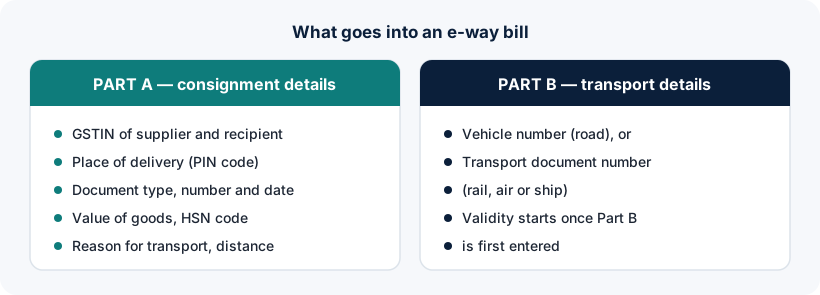
| Part A | Part B | |
|---|---|---|
| Contains | Supplier and recipient GSTINs, place of delivery, document number and date, value, HSN, reason for transport, approximate distance | Vehicle number for road, or transport document number for rail, air or ship |
| Who fills it | Supplier, recipient or transporter (as applicable) | Whoever is causing the movement, usually the transporter |
| Effect | Part A alone doesn't make the e-way bill usable for movement | Validity starts when Part B is first entered |
Step-by-step generation on the official portal
- Log in
Sign in at ewaybillgst.gov.in with your username, password, captcha and OTP. See E-Way Bill login steps.
- Choose e-Waybill → Generate New
Select the transaction type (outward or inward), sub-type (supply, export, job work, etc.), document type, and enter the document number and date.
- Enter the parties
Your details fill in automatically. Enter the other party's GSTIN (or URP if unregistered) and the dispatch and delivery addresses and PIN codes.
- Enter item details
Add each product with HSN code, quantity, taxable value and tax rates. Check that the totals match your invoice.
- Enter transport details (Part B)
Choose the mode, enter the approximate distance (the portal checks it against the PIN-to-PIN distance), the transporter ID, and the vehicle number or transport document number.
- Submit and save the e-way bill
On submission the portal shows the e-way bill with its 12-digit number. Print it or save the PDF, and share the number with the transporter.
Generate on the official portal
E-way bills can only be generated on the government portals (or through authorised API/GSP systems). This website doesn't generate e-way bills.
Other ways e-way bills are generated
- Bulk upload: the portal offers a bulk generation tool for businesses that create many e-way bills.
- API / GSP integration: larger businesses connect their accounting or ERP systems directly. This needs separate API registration on the portal.
- From an e-invoice: taxpayers who issue e-invoices can generate the e-way bill using the IRN. See e-invoice login.
- E-Way Bill 2.0 portal: generation is also possible on ewaybill2.gst.gov.in.
The 180-day document rule
From 1 January 2025, the portal doesn't allow an e-way bill to be generated for a base document (such as an invoice) dated more than 180 days before the generation date. If your document is older, you'll need to check with your tax adviser how to proceed.
After generation: update, extend, cancel
| Action | When | Notes |
|---|---|---|
| Update Part B / change vehicle | Any time during validity | Needed when the vehicle changes or goods are transhipped |
| Extend validity | Around expiry (the portal opens a window shortly before and after expiry) | Give the reason and remaining distance; total validity is capped at 360 days from generation |
| Cancel | Within 24 hours of generation | Only if goods haven't moved or the e-way bill was wrong, and it hasn't been verified in transit |
| Reject (by the other party) | Within 72 hours of the details being made available, or before delivery if earlier | If not rejected in time, it is treated as accepted |
Common generation errors
- Distance rejected: the distance entered is much higher than the portal's PIN-to-PIN calculation. Check the PIN codes.
- Document too old: the 180-day rule above.
- GSTIN blocked: your or the other party's GSTIN is blocked for unfiled returns. See GSTIN blocked.
- Duplicate document: an e-way bill already exists for the same document number for your GSTIN.
Frequently asked questions
How do I generate an e-way bill online?
Log in to ewaybillgst.gov.in, choose e-Waybill → Generate New, fill Part A (document, parties, goods, value, distance) and Part B (vehicle or transport document), and submit. The portal generates a 12-digit e-way bill number.
Can I generate an e-way bill without logging in?
No. Generation requires a login on the official portal (or an authorised API/GSP connection).
Can I generate an e-way bill for an invoice older than 180 days?
No. Since 1 January 2025, the portal blocks generation when the base document is dated more than 180 days before the generation date.
How long do I have to cancel an e-way bill?
An e-way bill can be cancelled within 24 hours of generation, provided it hasn't been verified in transit.
Is there an online e-way bill generator outside the portal?
E-way bills are valid only when generated on the government system, either through the official portals or through authorised API/GSP integrations. Third-party “generators” that don't connect to the government system can't create a valid e-way bill.
Ready to log in?
Use only the official government portal. ewaybillogin.com never asks for your password or OTP.
Official sources and references
- E-Way Bill user manual (PDF) (opens official site in a new tab)
- CBIC GST portal: CGST Rules (Rule 138) (opens official site in a new tab)
- Advisory on updates to E-Way Bill (PDF) (opens official site in a new tab)
- E-Way Bill FAQs (official documentation) (opens official site in a new tab)
- E-Way Bill System (official portal) (opens official site in a new tab)
We check these sources before each review. Portal screens and rules can change, so if something here differs from what you see on the official portal, follow the portal and tell us.