
E-Way Bill Sub-User: Create, Log In and Manage
The main user creates sub-users under User Management → Create Sub-user. Each sub-user gets a login ID made of the main username plus a suffix (for example MAINUSER_SUFFIX) and a password sent to their own mobile and email. Sub-users log in on the same official portal with their own OTP.
On this page
Why use sub-users?
- No password sharing: staff get their own login instead of the owner's.
- Control: you choose what each sub-user can do, such as generate but not cancel.
- Branch-wise access: sub-users are linked to a place of business.
- Accountability: you can see who did what, and freeze a sub-user when someone leaves.
What is a suffix login ID?
When you create a sub-user, the portal asks you for a suffix, a short code of your choice. The sub-user's login ID is your main username, an underscore, and the suffix. In the example below, the main username is RAJTRADERS01 and the suffix is BR2, so the sub-user logs in as RAJTRADERS01_BR2.
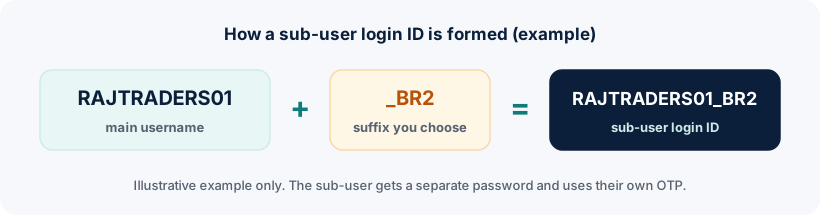
The portal checks whether the suffix is available before creating the ID. Choose suffixes that mean something to you, such as a branch code or role.
How to create a sub-user
- Log in as the main user
Use the main account on ewaybillgst.gov.in.
- Open User Management → Create Sub-user
The portal may ask you to verify with an OTP first.
- Enter and check the suffix
Type the suffix and use the availability check.
- Enter the sub-user's details
Name, designation, mobile number and email of the person who'll use this ID.
- Choose the place of business and permissions
Select which place(s) of business the sub-user works for and which functions they can perform.
- Submit
The portal creates the sub-user and sends the password to the sub-user's mobile and email.
Roles and permissions
| Permission area | Typical use |
|---|---|
| Generate e-way bills | Dispatch or billing staff |
| Update vehicle / Part B | Logistics coordinators |
| Reject e-way bills | Staff who receive goods |
| Cancel e-way bills | Usually only senior staff |
| Reports | Accounts and compliance staff |
How to log in with a sub-user ID
- Open the official portal and click Login
Use the same portal as the main user, ewaybillgst.gov.in.
- Enter the full sub-user ID
Type the complete ID with the underscore and suffix, for example RAJTRADERS01_BR2, not just the suffix.
- Enter the password and captcha
Use the password sent to you when the sub-user was created, or the one you set later.
- Complete the OTP step
The OTP is linked to the sub-user's own registered mobile number, not the main user's.
How many sub-users can you create?
The portal limits the number of sub-users for each place of business. Published guides quote different numbers for this limit, so rely on what the portal's User Management screen allows for your account rather than on a figure from a blog.
Update, freeze or remove a sub-user
- Update Sub-user: change the permissions or places of business assigned to an existing sub-user.
- Freeze Sub-user: immediately stop a sub-user from logging in, for example when an employee leaves. Do this promptly.
- Review your sub-users regularly so that only current staff have access.
Sub-user OTP and two-factor authentication
Sub-users authenticate with the mobile number registered for that sub-user. Make sure the mobile number you enter when creating the sub-user belongs to the person who'll actually log in. Read more in our E-Way Bill login OTP guide.
Frequently asked questions
What is a suffix login ID in E-Way Bill?
It is the short code the main user chooses when creating a sub-user. The sub-user's login ID becomes the main username, an underscore and the suffix, for example RAJTRADERS01_BR2.
How do I log in to the E-Way Bill portal with a sub-user ID?
On the official login page, enter the full sub-user ID (main username, underscore, suffix), the sub-user password and the captcha, then the OTP sent to the sub-user's registered mobile.
Who creates a sub-user?
The main (GSTIN) user creates sub-users from User Management after logging in.
Can I stop a former employee from using their sub-user login?
Yes. Use Freeze Sub-user in User Management to block that sub-user's access.
Ready to log in?
Use only the official government portal. ewaybillogin.com never asks for your password or OTP.
Official sources and references
- E-Way Bill user manual (PDF) (opens official site in a new tab)
- E-Way Bill FAQs (official documentation) (opens official site in a new tab)
- E-Way Bill System (official portal) (opens official site in a new tab)
We check these sources before each review. Portal screens and rules can change, so if something here differs from what you see on the official portal, follow the portal and tell us.