
How to Print or Download an E-Way Bill
Without login: use the official portal's public e-way bill print option and enter the e-way bill number and the other details it asks for. With login: go to e-Waybill → Print EWB. In both cases, use your browser's Print → Save as PDF to download it.
On this page
With login vs without login
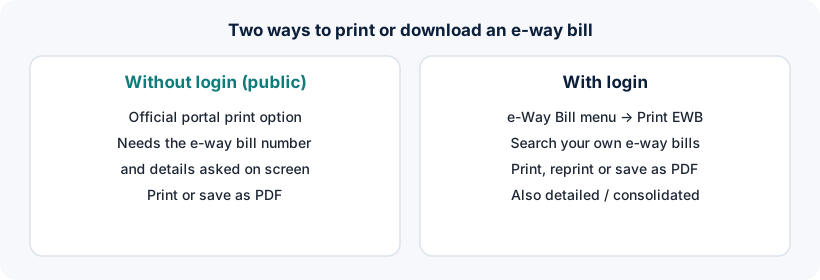
Without login
- Print an e-way bill if you know its number
- Useful for drivers, transporters and recipients
- Can't search or list your e-way bills
- Can't edit, extend or cancel
With login
- Print any e-way bill from your account
- Search by number, date or document
- Print consolidated e-way bills
- Update, extend or cancel from the same screen
How to print an e-way bill without login
- Open the official portal
Go to ewaybillgst.gov.in. Don't use third-party sites for this, because they may misuse e-way bill details.
- Find the public e-way bill print option
It is available from the portal's home page without logging in. Menu labels may change over time.
- Enter the details requested
Typically the 12-digit e-way bill number and other identifying details shown on screen (such as the generation date or generator's GSTIN), plus the captcha.
- Print or save as PDF
When the e-way bill appears, use your browser's Print option. Choose a printer, or Save as PDF to download.
The public option is meant for printing an e-way bill you already have details for. It doesn't let anyone browse e-way bills. If the details you enter don't match, it won't show the e-way bill.
How to print after logging in (Print EWB)
- Log in to the official portal
Username, password, captcha and OTP. See E-Way Bill login steps.
- Go to e-Waybill → Print EWB
Enter the e-way bill number, or search by date or document if your portal version offers it.
- Choose summary or detailed print
Pick the format you need, if both are offered.
- Print or save as PDF
Use the print button or your browser's Save as PDF.
Consolidated e-way bills (for several consignments in one vehicle) have their own print option under the consolidated e-way bill menu.
How to save an e-way bill as PDF
| Device | Steps |
|---|---|
| Windows / Mac computer | Press Ctrl + P (Cmd + P on Mac) → choose Save as PDF or Microsoft Print to PDF → Save |
| Android phone | Browser menu → Share → Print → select Save as PDF → download icon |
| iPhone / iPad | Share → Print → pinch out on the preview → Share → Save to Files |
Printing from the E-Way Bill 2.0 portal
E-way bills are mirrored between the two official portals, so you can also log in at E-Way Bill 2.0 and print from there, which is handy when the main portal is slow.
Does the driver need a printed copy?
The person in charge of the vehicle must carry the invoice or other document and either a physical copy of the e-way bill or its number. In many cases the number alone, or the e-way bill on a phone, works, but carrying a printed copy avoids delays at checks.
Printing problems and fixes
| Problem | Fix |
|---|---|
| “Details not found” without login | Re-check the e-way bill number and the other details; they must match exactly |
| Print window doesn't open | Allow pop-ups for the official site, or try another browser |
| Text cut off on the page | In print settings, choose A4, portrait, and “Fit to page” |
| E-way bill shown as cancelled | A cancelled e-way bill can't be used for movement; contact the generator |
Frequently asked questions
How can I print an e-way bill without login?
Use the public e-way bill print option on ewaybillgst.gov.in. Enter the e-way bill number and the other details it asks for, complete the captcha, and print or save as PDF.
How do I download an e-way bill PDF?
Open the e-way bill (with or without login), then use your browser's Print option and choose Save as PDF.
Can I print someone else's e-way bill without login?
Only if you have its number and the matching details requested by the portal. The public option doesn't allow searching or browsing e-way bills.
Where is Print EWB on the portal?
After logging in, it is under the e-Waybill menu as Print EWB.
Ready to log in?
Use only the official government portal. ewaybillogin.com never asks for your password or OTP.
Official sources and references
- E-Way Bill user manual (PDF) (opens official site in a new tab)
- E-Way Bill FAQs (official documentation) (opens official site in a new tab)
- E-Way Bill System (official portal) (opens official site in a new tab)
- E-Way Bill 2.0 portal (opens official site in a new tab)
We check these sources before each review. Portal screens and rules can change, so if something here differs from what you see on the official portal, follow the portal and tell us.