
E-Way Bill Registration and First Login
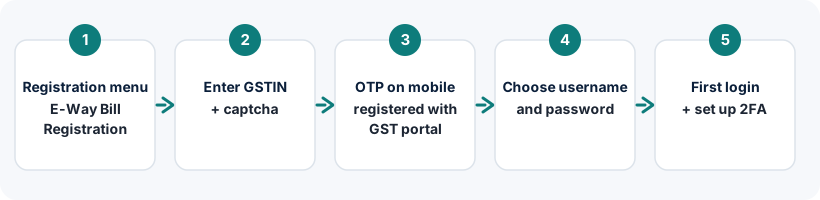
On the official portal, go to Registration → E-Way Bill Registration, enter your GSTIN, verify the OTP sent to the mobile number registered with your GST registration, and choose a username and password. Then log in and complete the OTP step.
On this page
Who needs to register?
Every GST-registered person who will generate e-way bills, or act on e-way bills as a recipient or a registered transporter, needs a login on the E-Way Bill portal. Registration is a one-time process for each GSTIN. If you only need staff to use the portal, register the main account first and then create sub-users.
Not registered under GST and working as a transporter? Use transporter ID enrolment instead.
What you need
- Your GSTIN.
- The mobile number registered with your GST registration, because the OTP is sent there. Your business details are fetched from the GST records.
- A username and password you've decided on.
Step-by-step registration
- Open the official portal
Go to ewaybillgst.gov.in. Use the Registration menu and choose E-Way Bill Registration.
- Enter your GSTIN and captcha
Submit to fetch your business details from the GST records.
- Verify with OTP
Request the OTP and enter the code sent to the mobile registered with your GST registration.
- Check your details
The portal shows your business name, address and contact details from the GST system. If they're wrong or outdated, update them on the GST common portal first.
- Choose a username
Enter the username you want and check its availability. If it's taken, try a variation.
- Set your password and submit
Enter and confirm the password, then submit. Your E-Way Bill account is created.
Choosing a username and password
The portal displays the rules for usernames and passwords on the registration screen; follow what you see there. In practice:
- Usernames are commonly between 8 and 15 characters. Pick something you'll remember that isn't simply your GSTIN.
- Passwords should be at least 8 characters, ideally mixing upper- and lower-case letters, numbers and symbols. They are case-sensitive.
- Write the username down somewhere safe. Most recovery requests are for forgotten usernames.
Your E-Way Bill username is separate from your GST portal username. Using the GST portal login on the E-Way Bill portal is one of the most common causes of “invalid username or password” errors.
Your first login and two-factor authentication
- Click Login on the official portal
Enter the new username, password and captcha.
- Complete the OTP step
Two-factor authentication is mandatory for all users. Enter the OTP from your chosen method.
- Set up your preferred OTP method
If SMS is unreliable where you work, switch to the Sandes or NIC-GST-Shield app. See the OTP guide.
- Explore the main menu
From here you can generate e-way bills, view reports and manage users.
Common registration problems
| Problem | Likely reason | What to do |
|---|---|---|
| OTP goes to an old number | GST registration has an outdated mobile number | Update contact details on the GST common portal through an amendment, then register |
| “Already registered” | Someone in your business registered this GSTIN before | Use Forgot Username to retrieve the existing login |
| GSTIN details not found | Typo in GSTIN, or registration not active | Re-check the GSTIN and its status on the GST portal |
| Username not available | Another user already has it | Try a different combination |
Next steps after registering
Create sub-users
Give staff and branches their own logins.
Read guide →Generate your first e-way bill
Fill Part A and Part B correctly.
Read guide →Frequently asked questions
How do I create an E-Way Bill login ID?
Go to Registration → E-Way Bill Registration on ewaybillgst.gov.in, enter your GSTIN, verify the OTP sent to your GST-registered mobile, and choose a username and password.
How do I log in to the E-Way Bill portal for the first time?
After registering, click Login, enter your new username, password and captcha, then complete the OTP step. You can then set up your preferred two-factor method.
Can I register on the E-Way Bill portal without a GSTIN?
Only transporters can, through transporter enrolment (Form GST ENR-01), which gives a Transporter ID. Suppliers and recipients need a GSTIN.
Can I have more than one login for my GSTIN?
There is one main login per GSTIN. For staff and branches, the main user creates sub-users with their own IDs and permissions.
Ready to log in?
Use only the official government portal. ewaybillogin.com never asks for your password or OTP.
Official sources and references
- E-Way Bill user manual (PDF) (opens official site in a new tab)
- E-Way Bill FAQs (official documentation) (opens official site in a new tab)
- E-Way Bill System (official portal) (opens official site in a new tab)
- GST common portal (opens official site in a new tab)
We check these sources before each review. Portal screens and rules can change, so if something here differs from what you see on the official portal, follow the portal and tell us.